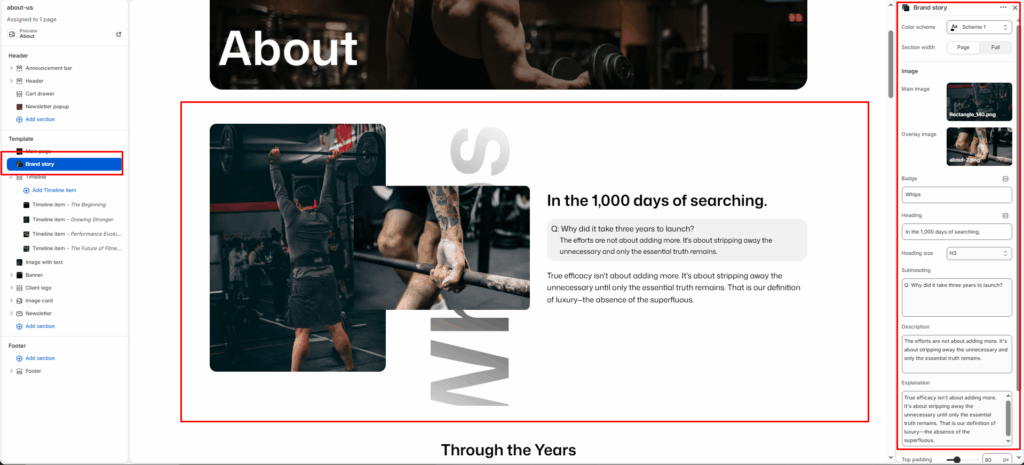
The Brand Story is designed to showcase the brand’s identity and narrative in a visually compelling layout. It allows merchants to combine overlapping images, a badge, heading, subheading, and descriptive text to tell an authentic and engaging brand story.
Section Settings
Color scheme
Select a predefined color palette to match your theme’s aesthetic.
Section Width
- Full: Stretches the section to the edges of the browser window.
- Page: Constrains the content to the theme’s maximum site width.
Main image
Upload the primary background image to represent the brand visually.
Overlay image
Upload a secondary image that overlaps the main image, creating a layered visual effect.
Badge
Enter a short badge text to display as a label on the section. E.g., Whisp.
Heading
Add a bold heading to introduce the brand story. E.g., In the 1,000 days of searching.
Heading size
Select the size of the heading (e.g., H1, H2, H3, H4, H5, H6).
Subheading
Add a subheading or question to draw the reader into the story. E.g., Q: Why did it take three years to launch?
Description
Add a short description that answers or expands on the subheading. Keep it concise and impactful. E.g., The efforts are not about adding more. It’s about stripping away the unnecessary and only the essential truth remains.
Explanation
Add a longer explanatory paragraph to further elaborate on the brand’s philosophy or story. E.g., True efficacy isn’t about adding more. It’s about stripping away the unnecessary until only the essential truth remains. That is our definition of luxury — the absence of the superfluous.
Top padding / Bottom padding
Adjust vertical spacing above and below the section for consistent layout spacing.