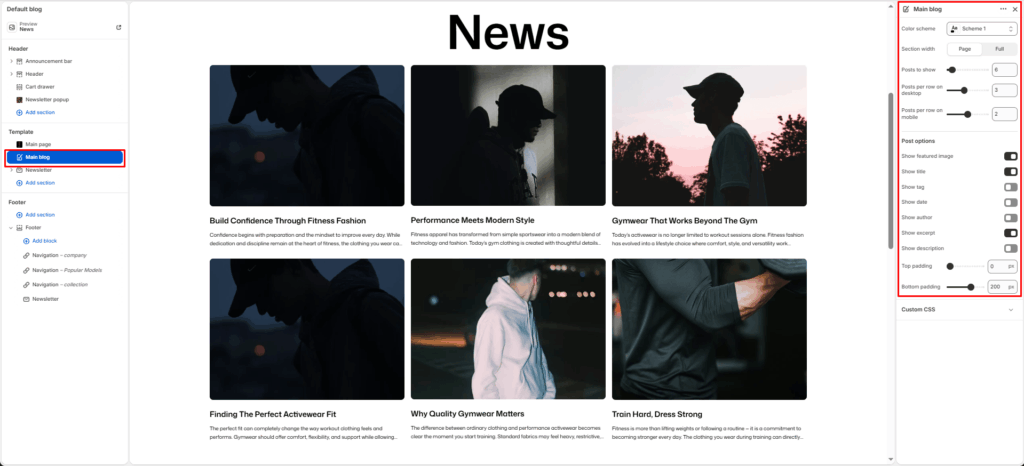
The Main Blog section displays your store’s blog posts in a customizable grid layout. It allows you to showcase featured images, titles, excerpts, author names, and post dates. The layout is responsive and supports pagination for browsing multiple posts.
Section Settings
Color scheme
Selects the background and text color combination for the overall section.
Section width
Determines how wide the blog section appears:
- Full: Makes the section span edge-to-edge across the screen.
- Page: Keeps the layout within the standard site container width.
Posts to show
Controls how many blog posts are shown per page.
Posts per row on desktop
Sets how many posts appear in one row on desktop devices.
Posts per row on mobile
Sets how many posts are displayed per row on mobile devices.
Post Options
Blog post color scheme
Allows selecting a color scheme specifically for blog post cards (can differ from the main section scheme).
Show featured image
Toggles whether to display the blog post’s featured image.
Show title
Enables or hides the blog post title.
Show tag
Displays the tag associated with each post (if available).
Show date
Shows the publication date of each blog post.
Show author
Displays the blog post author name.
Show excerpt
Shows the beginning portion of the blog post content (short summary or first few lines).
Show description
Displays the full blog post description (if you prefer showing more text than just the excerpt).
Top padding
Adds vertical spacing at the top of the section.
Bottom padding
Adds vertical spacing at the bottom of the section.