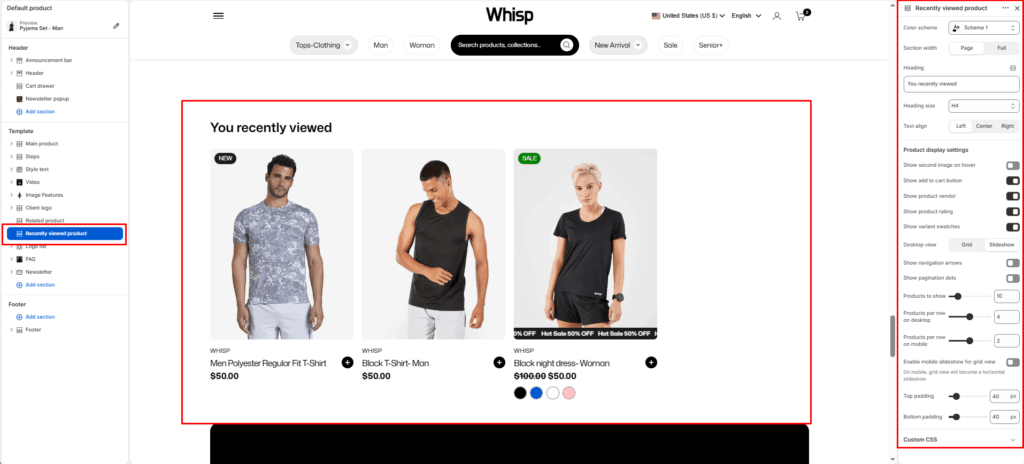
The Recently viewed product section is designed to display a recently check products on the product page. It helps increase cross-selling opportunities and improves customer browsing experience by showcasing similar or recommended items. The layout supports both grid and slider views, allowing full customization for desktop and mobile displays.
Section Settings
Color Scheme
Selects the overall visual theme for the section. Based on theme presets (e.g., Scheme 1, Scheme 2, etc.)
Section Width
Choose how wide the section spans on the page:
- Page: Keeps the content aligned with the main page container.
- Full: Stretches the section across the full browser width.
Heading
Sets the main title of the section.
Heading Size
Select the size of the left-side heading (e.g., H1, H2, H3, H4, H5, H6).
Text Align
Choose the alignment of the section heading (Left, Center, or Right).
Product Display Settings
Show Second Image on Hover
Displays the product’s secondary image when hovered over (if available).
Show Add to Cart Button
Displays an Add to Cart button directly under each product card.
Show Product Vendor
Displays the product vendor name (brand or supplier) below the product title.
Show Product Rating
Shows the star rating or review snippet below the product name (if enabled through metafields or app).
Show variant swatches
Shows available variants as swatches or buttons.
Desktop view mode
Choose how products appear on desktop:
- Grid–static layout.
- Slider–scrollable carousel format.
Products to Show
Controls how many total products appear in the section.
Products per Row on Desktop
Sets the number of products displayed per row in desktop view.
Products per Row on Mobile
Defines how many products are shown side-by-side on mobile devices.
Enable Mobile Slider for Grid View
Turns the static grid into a slider layout only on mobile screens, improving usability and navigation.
Slider Controls
(Available when slideshow is enabled)
- Show navigation arrows
- Show pagination dots
Layout Settings
Top Padding
Adds space above the section to separate it visually from other content.
Bottom Padding
Adds space below the section.