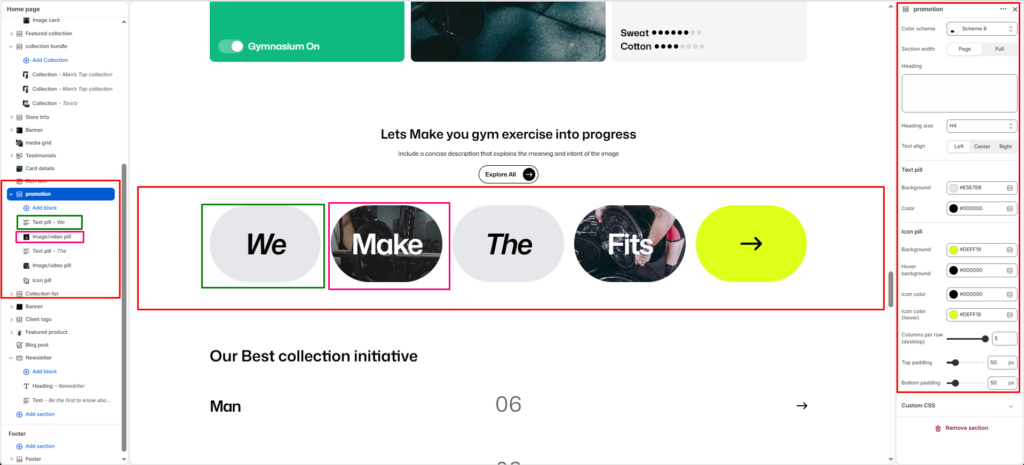
The Promotion is designed to display a dynamic row of pill-shaped blocks combining text, images, videos, and icons in a visually striking horizontal layout.
Section Settings
Color scheme
Choose the color scheme that matches your site design. This affects text and button colors over the section.
Section width
Choose how wide the section appears on the page:
- Page–keeps the video within the page content width.
- Full–expands the video to full browser width.
Heading
Add a main heading for the section.
Heading size
Select a heading size from theme-defined options such as h1, h2, h3, h4, h5, and h6.
Text Pill Settings
Background
Set the background color for all text pill blocks.
Color
Set the text color for all text pill blocks.
Icon Pill Settings
Background
Set the background color of the icon pill block.
Hover background
Set the background color of the icon pill block on hover.
Icon color
Set the color of the icon displayed inside the pill.
Icon color (hover)
Set the color of the icon on hover.
Columns per row (desktop)
Set the number of pill blocks to display per row on desktop using a slider.
Top padding
Adjust the spacing above the section in pixels.
Bottom padding
Adjust the spacing below the section in pixels.
Text Pill Block
Each Text Pill block displays a styled pill shape containing bold italic text.
Text
Enter the text to display inside the pill. E.g., We, The.
Link
Enter a URL or search for a page to make the text pill clickable.
Image/Video Pill Block
Each Image/Video Pill block displays a pill shape filled with an image or video, with optional overlay text.
Media type
Select the type of media to display inside the pill:
- Image: Displays an uploaded image inside the pill.
- Video: Displays a video inside the pill.
Upload image
Upload an image to fill the pill shape. You can also explore free images.
Upload video
Upload a video file to display inside the pill.
Video URL (YouTube/Vimeo)
Enter a YouTube or Vimeo URL to embed an external video inside the pill.
Overlay text
Add text to display as an overlay on top of the image or video inside the pill. E.g., Make, Fits.
Link
Enter a URL or search for a page to make the image/video pill clickable.