The Image Features section is designed to showcase a product image with highlighted feature callouts.
Color scheme
Choose the theme color palette for this section.
Section width
Choose how wide the section spans on the page:
- Page: Keeps the content aligned with the main page container.
- Full: Stretches the section across the full browser width.
Heading
Add a heading to highlight the message related to the image.
Heading size
Select the size of the heading (e.g., H1, H2, H3, H4, H5, H6).
Description
Add descriptive text to explain more about the left-side image or content. Keep it concise and engaging.
Text size
Control the size of the left-side body text (e.g., H1, H2, H3, H4, H5, H6).
Image
Upload an image of the section. This image is typically used to represent product quality or key visual content.
Top padding
Adjust the spacing above the section in pixels.
Bottom padding
Adjust the spacing below the section in pixels.
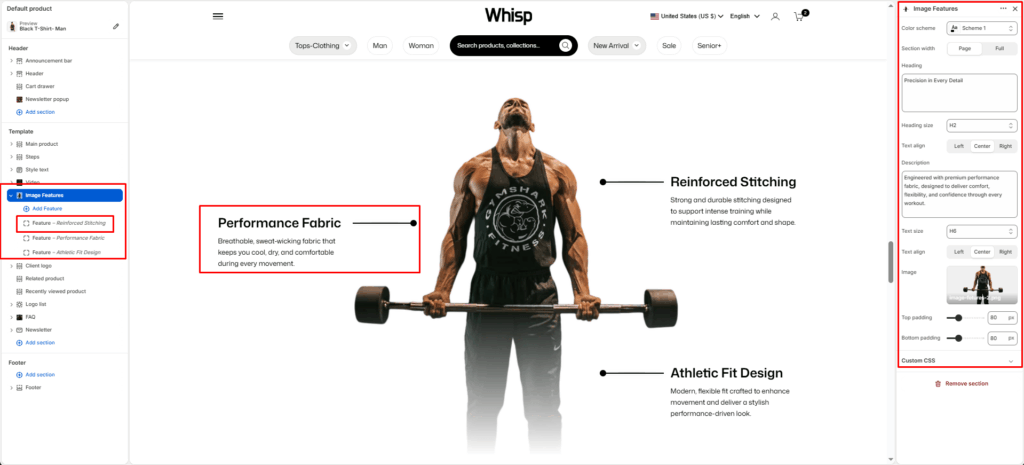
Feature Block
Each Feature block represents a single callout pointer on the product image.
Content position
Set the position of the feature callout on the image:
- Top Left
- Top Right
- Bottom Left
- Bottom Right
Position top
Adjust the vertical position of the callout pointer on the image using a slider (in pixels).
Heading
Enter the feature title to display as the callout heading. E.g., Reinforced Stitching.
Description
Add a short description explaining the highlighted feature. E.g., Strong and durable stitching designed to support intense training while maintaining lasting comfort and shape.


