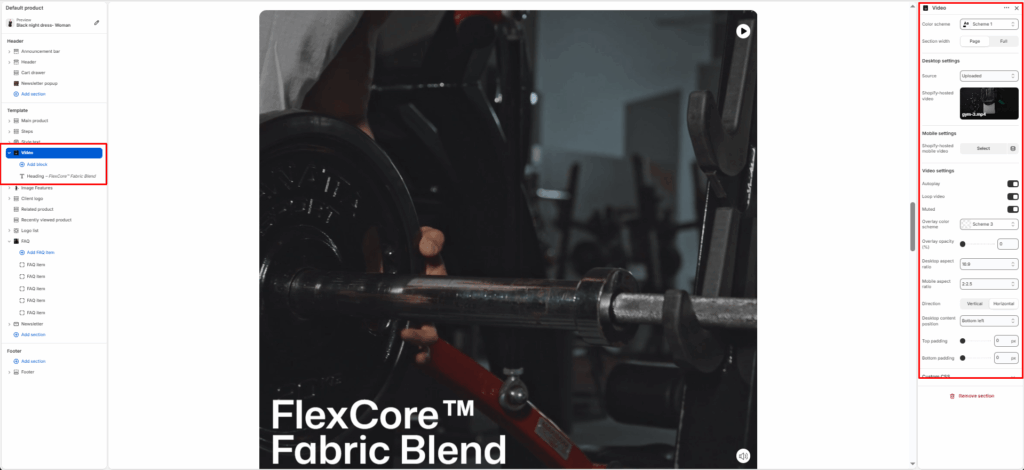
The Video Section allows you to display engaging video content on your store’s homepage or other templates. It’s perfect for showcasing your brand story, product highlights, or campaign visuals using YouTube or Vimeo links.
This section includes flexible layout options, overlay controls, autoplay settings, and responsive aspect ratios for a polished video presentation across all devices.
Color scheme
Choose the color scheme that matches your site design. This affects text and button colors over the video.
Section width
Choose how wide the section appears on the page:
- Page–keeps the video within the page content width.
- Full–expands the video to full browser width.
Source
Select the video source type. Options:
- External URL–add YouTube or Vimeo video links.
- Shopify-hosted video–for uploaded media.
- Image–for uploaded image.
YouTube or Vimeo video URL
Paste your video URL (supports YouTube and Vimeo). The video will automatically embed with proper scaling and responsive behavior.
Autoplay
Enable this to start the video automatically when the section loads. (Note: Browser restrictions may mute autoplayed videos.)
Loop video
When enabled, the video will restart automatically once it finishes playing.
Muted
Mutes the video’s sound by default. Recommended when autoplay is enabled for a better user experience.
Overlay opacity (%)
Adjust the darkness of the overlay layer placed above the video. Useful for improving text contrast. Range: 0-100%.
Desktop aspect ratio
Select the video aspect ratio for desktop view. Common options: 1:1, 3:2, 16:9, 4:3.
Mobile aspect ratio
Select the aspect ratio for mobile screens. Keeps videos well-proportioned on smaller displays.
Direction
Controls the layout of text and buttons relative to the video:
- Vertical – stacks content vertically.
- Horizontal – places content side by side.
Desktop content position
Defines where content appears over the video. Options: Top left, top center, top right, middle left, middle center, middle right, bottom left, bottom center, and bottom right.
Top padding
Adds spacing above the section to adjust layout spacing.
Bottom padding
Adds spacing below the section for layout balance.