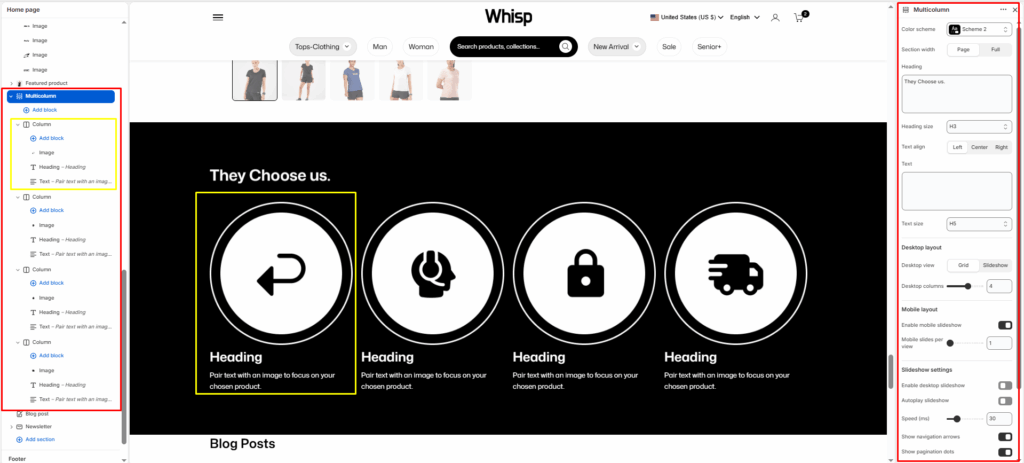
The Multicolumn section is designed to display a series of content blocks (columns) side-by-side.
It’s ideal for showcasing features, values, benefits, or services — for example, highlighting brand qualities, product advantages, or key information in a visually organized layout.
Each column supports an image, title, text, and optional link, giving merchants flexible control over how content is presented.
Section Settings
Color scheme
Select a color scheme to match your theme’s style and improve contrast for readability.
Section width
Choose how wide the section should appear:
- Page: Keeps content within the main page container.
- Full: Extends content edge-to-edge across the browser window.
Heading
The main title displayed above the columns.
Heading size
Choose the heading’s text style (H1, H2, H3, H4, H5, H6, etc.) based on the visual hierarchy of the page.
Text align
Set the alignment for the section heading and description:
- Left
- Center
- Right
Text
Add an introductory paragraph or supporting description beneath the heading.
Text size
Adjust the font size for the section’s description to match the visual design.
Columns per row (desktop)
Define how many columns appear side-by-side on desktop screens.
Common options: 2-4 columns per row.
Stack columns on mobile
Enable this option to stack columns vertically on smaller devices for better readability and spacing.
Top padding / Bottom padding
Control vertical spacing above and below the section. Useful for maintaining consistent layout flow.
Blocks (Columns):
Each Column block represents one content card inside the multicolumn layout.
Multiple columns can be added to form rows of equal-height, balanced items.
Available Block: Column
Each column block contains the following options:
Image
Upload an image to represent the column visually.
Ideal for product shots, icons, or feature illustrations.
Heading
The title or label for the column content.
Text
Add a short description or supporting information beneath the heading.
Link (optional)
Add a button or make the image clickable by linking to another page, product, or collection.