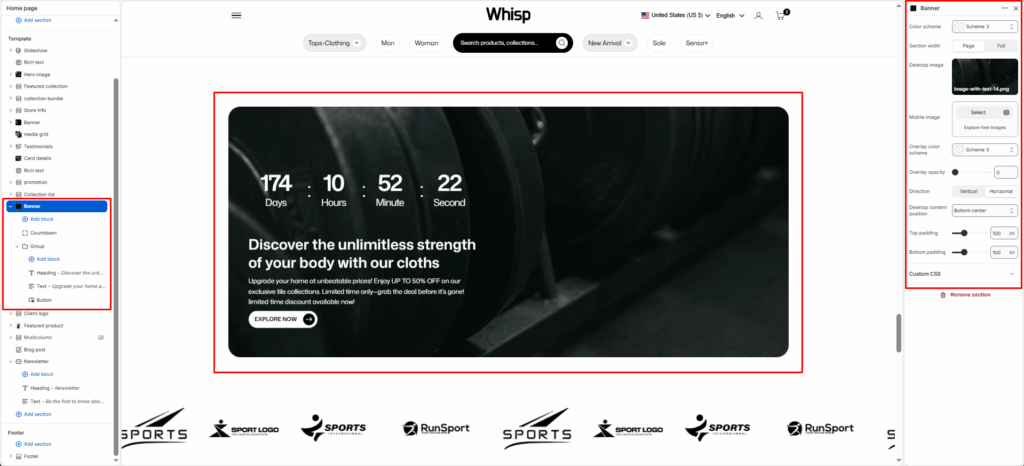
The Banner section is a visually impactful area designed to display a large background image (or video) with optional text overlay content. It’s commonly used on landing pages such as About Us, Collections, or Home, to introduce the page with strong visuals and key messaging.
This section supports responsive design with separate desktop and mobile image uploads, and flexible layout options for aligning text and call-to-action elements.
Section Settings
Color scheme
Choose a predefined color scheme to match the section’s text and overlay elements with the rest of the theme design.
Section width
Control how wide the banner appears:
- Page: Keeps the banner within the page container width.
- Full: Spans edge-to-edge across the browser window for a full-width banner experience.
Desktop image
Upload a high-quality banner image optimized for larger screens.
Mobile image
Optionally upload a separate image optimized for mobile devices to ensure visual clarity and proper scaling.
Overlay opacity
Adjust the dark overlay transparency on top of the banner image. This helps improve text readability and contrast.
Direction
Choose how the content (title, text, buttons) is arranged.
- Vertical: Stacks elements top to bottom.
- Horizontal: Places elements side-by-side (ideal for wide banners).
Desktop content position
Defines where the overlay content is positioned within the banner. Options typically include:
Top padding / Bottom padding
Add vertical spacing above and below the banner content for better layout balance.
Section Blocks
You can enrich your banner with multiple content blocks to create a compelling visual + textual combo.