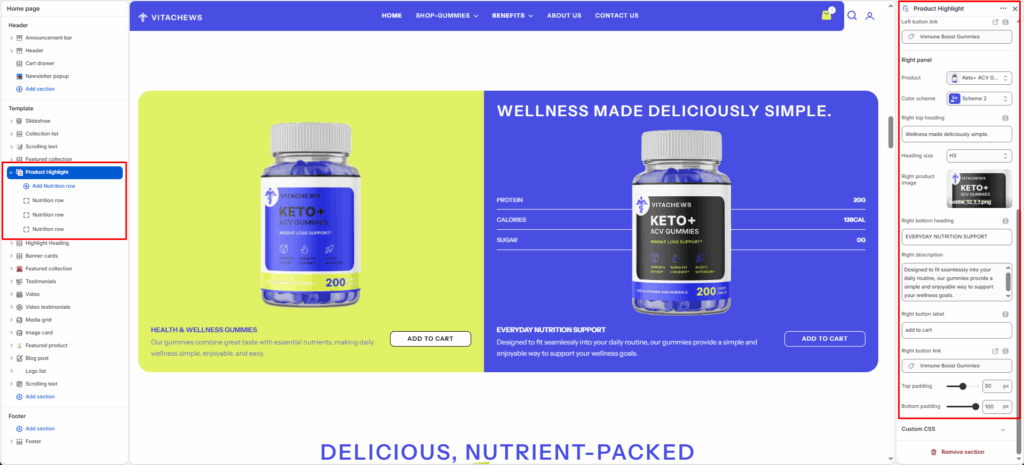
The Product Highlight section displays two product panels side by side — a left panel and a right panel — each with its own image, heading, description, button, and color scheme. It’s ideal for comparing products or promoting two featured items together.
Section Width
- Page: Constrains the content to the theme’s maximum site width.
- Full: Stretches the section to the edges of the browser window.
Text size
Select the size of description text — H4, H5, or H6.
Button style
Select the visual style applied to both panel buttons — Primary, Secondary, or Link.
Left Panel
Product
Select a product from your store to link the left panel’s Add to Cart button.
Color scheme
Select a background and text color scheme for the left panel.
Left product image
Upload an image to display on the left panel.
Left heading
Enter a heading for the left panel (e.g., HEALTH & WELLNESS GUMMIES).
Heading size
Select the size of the left panel heading — H1 through H6.
Left description
Enter a short description below the left panel heading.
Left button label
Enter the text for the left panel button (e.g., ADD TO CART).
Left button link
Enter the URL the left panel button navigates to when clicked.
Right Panel
Product
Select a product from your store to link the left panel’s Add to Cart button.
Color scheme
Select a background and text color scheme for the left panel.
Right product image
Upload an image to display on the left panel.
Right heading
Enter a heading for the left panel (e.g., HEALTH & WELLNESS GUMMIES).
Heading size
Select the size of the left panel heading — H1 through H6.
Right description
Enter a short description below the left panel heading.
Right button label
Enter the text for the left panel button (e.g., ADD TO CART).
Right button link
Enter the URL the left panel button navigates to when clicked.
Top/Bottom padding
Adjust the vertical spacing (in pixels) to give the section room to breathe.
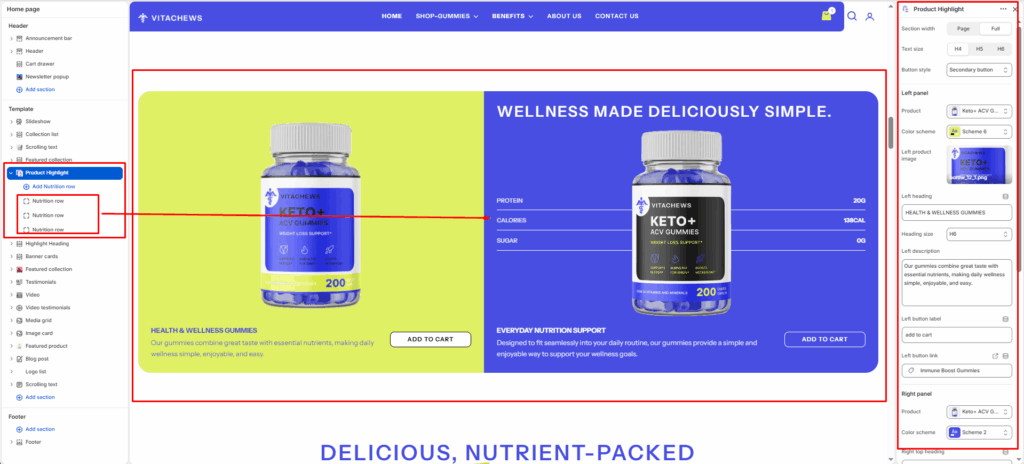
Blocks: Nutrition row
Add individual nutrition fact rows displayed as a list on the right panel. Each block contains
Label
Enter the nutrition label (e.g., PROTEIN, CALORIES, SUGAR).
Value
Enter the corresponding value (e.g., 20G, 138CAL, 0G).