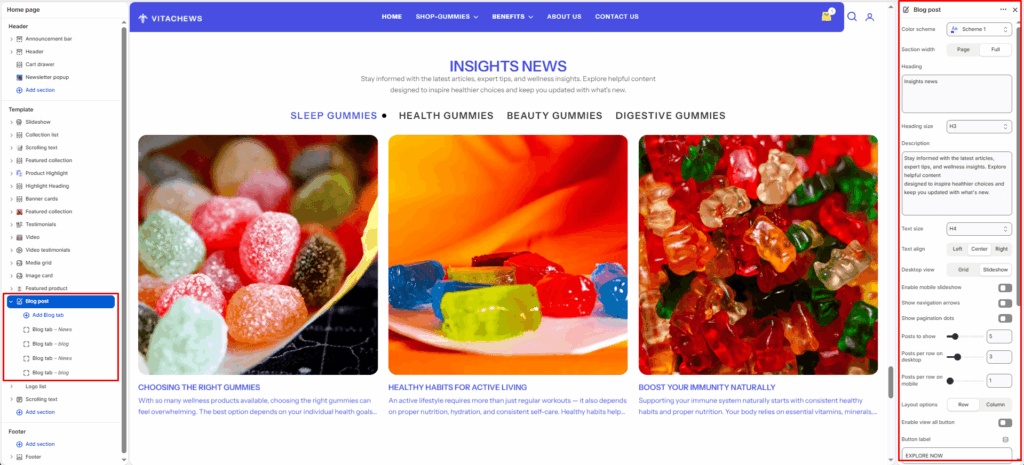
The Blog Post section showcases recent articles or stories from your Shopify blog. It’s ideal for highlighting educational content, product tips, lifestyle insights, or brand news — helping you engage customers and improve SEO visibility.
Section settings
Color scheme
Select a predefined color palette to ensure the blog section blends seamlessly with your store’s theme.
Section width
Choose between Page or Full to control the horizontal span of the section.
Heading
Add a main title for the blog section (e.g., Clean Journal).
Heading align
Align the section heading to Left, Center, or Right based on your design layout.
Heading style
Apply heading formatting (bold, italic, underline, etc.) or custom HTML for enhanced styling.
Description
Add a short subtext or summary below the section heading to give customers more context about the blog content.
Text align
Align the section heading to Left, Center, or Right based on your design layout.
Text style
Apply heading formatting (bold, italic, underline, etc.) or custom HTML for enhanced styling.
Desktop layout
Select between Grid or Slider layout for desktop view.
Enable mobile slider
Enable or disable the slider for mobile devices to optimize small-screen navigation.
Posts to show
Set how many posts should appear in the section.
Enable row gap
Adjust spacing between posts to balance layout density.
Show view all button
Toggle ON to display a “View All” or “See All” button linking to the full blog page.
View all button label
Customize the button text (e.g., SEE ALL).
Post options
Control what post details to show under each article.
Layout options
Choose between Vertical or Horizontal to control how the blog tabs are displayed — vertically stacked or in a horizontal row.
Post Options
Show featured image
Display the main image from each post.
Show tag
Show blog tags above the title if available.
Show title
Display the blog post’s title.
Show author
Include the author’s name for credibility.
Show excerpt
Display a short preview of the post content.
Top padding / Bottom padding
Adjust vertical spacing above and below the entire section.
Blog tab block
Tab label
Enter a custom label for the blog tab (e.g., News, Tips, Stories) that will appear as the tab title.
Blog
Select which blog from your Shopify admin to display articles under this tab.


