The Media Grid section displays a flexible bento-style grid of content cards. Each card can show text, statistics, images, or a combination of image and text — ideal for showcasing brand facts, product highlights, or key selling points in a visually dynamic layout.
Color scheme
Select your preferred color palette for the background and text.
Section width
- Page: Constrains the content to the theme’s maximum site width.
- Full: Stretches the section to the edges of the browser window.
Top/Bottom padding
Adjust the vertical spacing (in pixels) to give the section room to breathe.
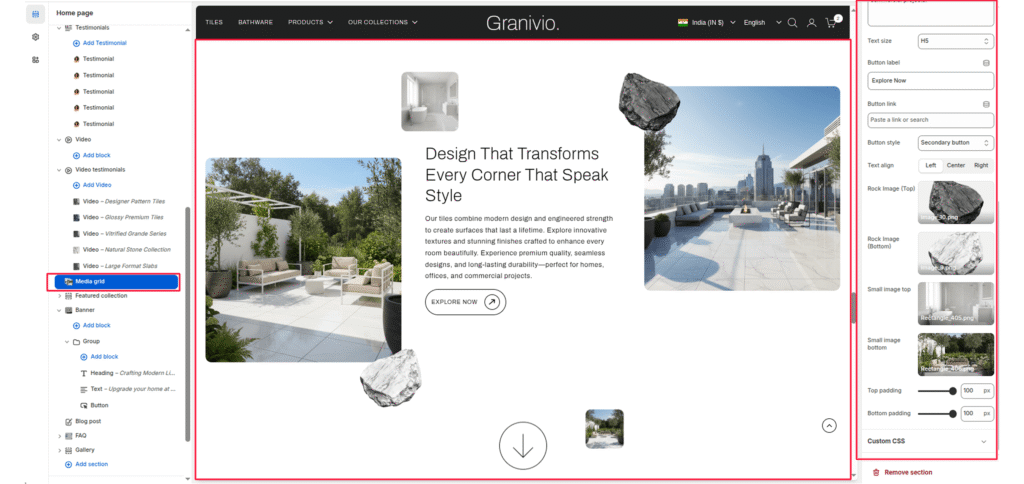
Blocks: (Media grid card)
Add individual cards to the grid. Each card is fully customizable in size, color, and content type.
Card type
Select the type of content to display in the card — Text, Stat, Image, or Image + Text.
Column span
Set how many columns the card occupies in the grid (1–12). Larger values create wider cards.
Row span
Set whether the card occupies 1 row or 2 rows in height.
Background color
Select the background color for the card.
Text color
Select the text color for the card..
Subheading
Enter a small label or eyebrow text displayed above the heading.
Heading
Enter the main text for the card (e.g., 2X, $3M, #1).
Heading size
Select the heading size — H1 through H6.
Description
Enter supporting text displayed below the heading.
Text size
Select the size of the description text — H1 through H6.
Image
Upload an image to display in the card (used with Image and Image + Text card types).
Image position
Choose the alignment of the content within the card — Left, Center, or Right.
Link button
Link
Enter the URL the card navigates to when the arrow button is clicked.
Show arrow button
Select the Show arrow button checkbox to show or hide a circular arrow link button on the card.
Icon grid
Show icon grid
Select the Show icon grid checkbox to display up to 4 icon items within the card.
Icon 1 – 4
Upload an icon image for each of the 4 icon slots.
Icon label
Enter a short label displayed below each icon (e.g., VEGAN OPTIONS, SUPPORTS IMMUNITY).
Icon text
Enter a short description displayed below each icon label.


