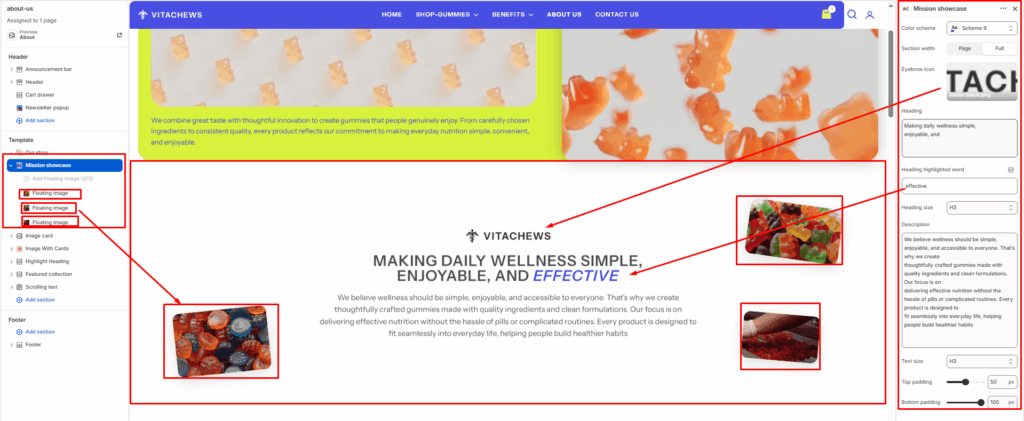
The Mission Showcase section is designed to highlight your brand’s mission, values, or key message with a centered content layout enhanced by decorative floating images. It is ideal for introducing your brand philosophy while creating a visually engaging and modern presentation.
Color scheme
Choose the theme color palette for this section.
Section width
Choose how wide the section spans on the page:
- Page: Keeps the content aligned with the main page container.
- Full: Stretches the section across the full browser width.
Eyebrow icon
Upload a small icon or logo displayed above the main heading to reinforce your brand identity.
Heading
Enter the primary heading for the section. This field supports multiple lines to create a bold visual statement.
Heading highlighted word
Enter a word or short phrase that appears highlighted at the end of the heading for added emphasis.
Heading size
Choose the heading size (H1–H6) to control the visual hierarchy.
Description
Add supporting text below the heading to explain your brand mission, values, or story.
Text size
Choose the size of the description text (H1–H6).
Top padding / Bottom padding
Adjust the spacing above and below the section for consistent page layout.
Blocks (Floating image)
Each Floating image block adds a decorative image positioned around the content to create depth and visual interest. You can add up to 3 floating images.
Image
Upload the image displayed as a floating decorative element.
Position
Choose where the floating image appears around the content.
- Top right
- Bottom left
- Bottom right
Rotation (degrees)
Adjust the rotation angle of the floating image to create a more natural and dynamic appearance. Values can range from -30° to 30°.